Published: |
PNPM Workspace with Git Submodules
See https://github.com/bodadotsh/pnpm-workspace-git-submodules for demo
A typical flow of managing frontend dependencies looks like this:
- Publish to a package registry, e.g.,
npm(public or private) - Define the external dependencies in
package.json - Install and use the library
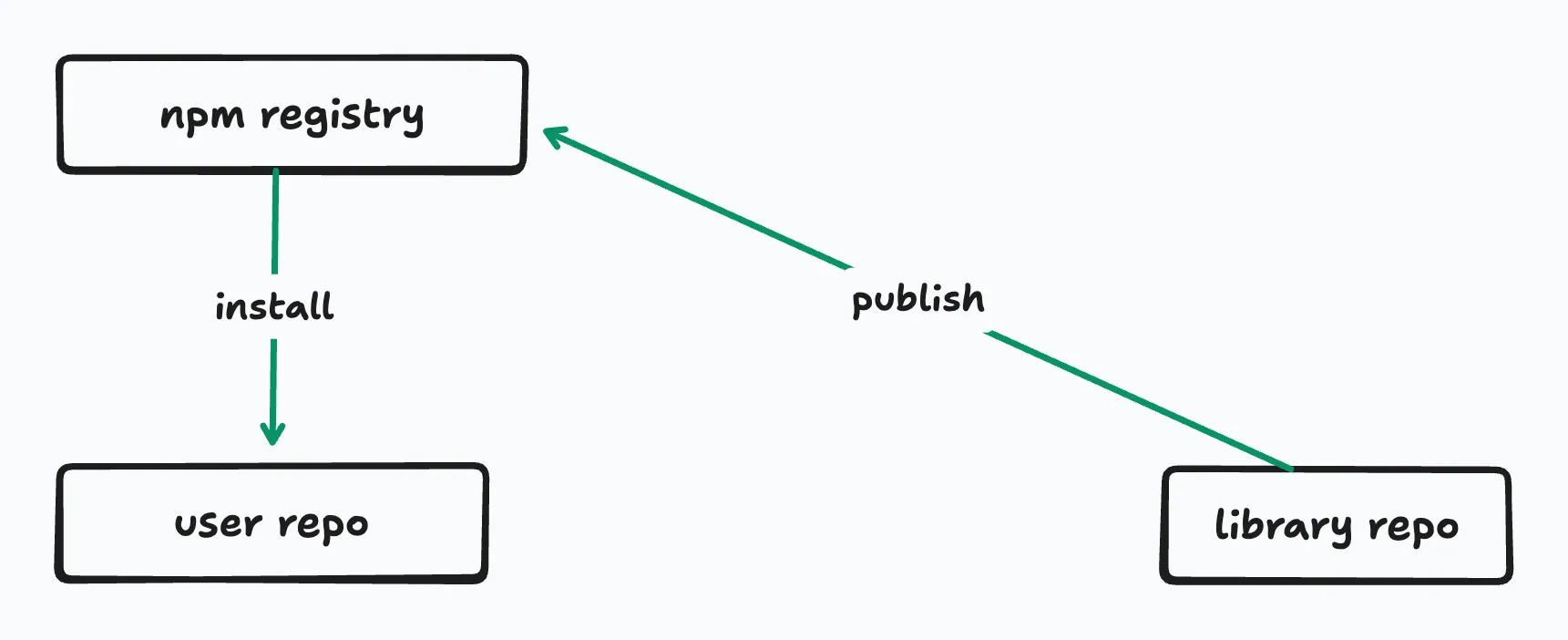
But given the supply chain attack patterns1, it is clear that hackers can infiltrate through npm and the public package registry can become a real security concern.
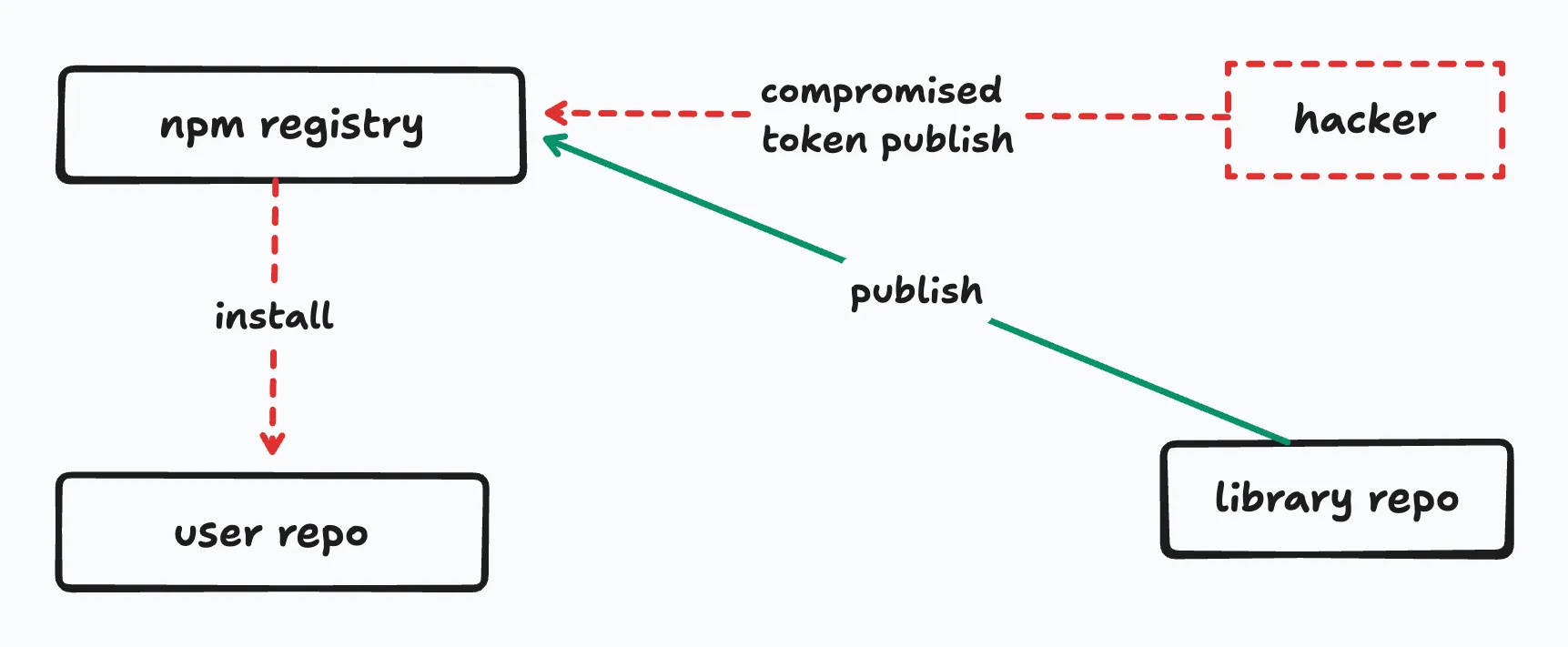
What if we reduce the attack factor by one, by removing npm, and gain few other benefits?
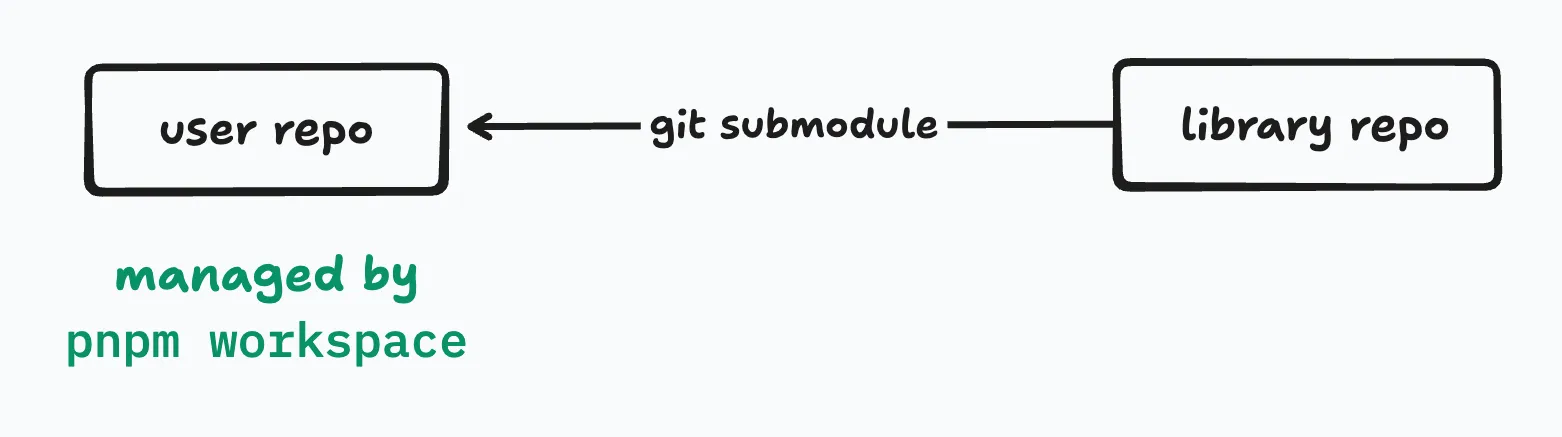
How It Works
The setup is surprisingly simple:
1. Add the external repository as a git submodule
git submodule add <remote-url> packages/<package-name>This clones the external repo into our packages directory.
2. Configure pnpm-workspace.yaml
PNPM will treat folders within packages as workspace packages if we define them in pnpm-workspace.yaml:
packages: - 'packages/*'3. Reference the package in package.json
In a package.json file, we can now reference the submodule package with the workspace:* protocol:
{ "dependencies": { "my-submodule-package": "workspace:*" }}4. That’s it
From here on, we can use the external library even if it’s not published to npm or another registry, and we can run normal pnpm workspace features like:
pnpm installpnpm -r buildSee https://github.com/bodadotsh/pnpm-workspace-git-submodules for demo
Advantages
Reduced supply chain attack surface
By removing npm registry, we eliminate the supply chain risk factor by one. The external library comes directly from git repos that we control or trust.
Instant access to the latest changes
We don’t have to wait for the library maintainers to publish a new version to npm. We can reference any git commit and use that commit’s build immediately:
cd packages/my-submodule-packagegit checkout <commit-hash>cd ../../pnpm -r buildEnjoy the pnpm monorepo features
PNPM is known for its great monorepo features: https://pnpm.io/workspaces. Including the external package as part of the monorepo means we can manage them altogether with useful commands like below:
# recursively run commandpnpm --recursive <command>
# filter commands to specific subsets of packages.pnpm --filter <package_selector> <command>
# deploy a package (bundle all deps to a directory)pnpm deploy <target directory>
# defining dependency version ranges as reusable constantspnpm catalog
Seamless cross-repo development
If we have control over both the main project and the library repo, we can make changes in both simultaneously. Edit the submodule, commit, push, all without leaving our development flow. Faster development and less context switching.
Downsides
Best when you have control over the external repo
This setup shines when we can contribute or update the external library. If we have no control over the external repo and our changes conflict with the upstream, we can update the content locally, but it will get out of sync with the external origin.
Compatibility with pnpm
The external library needs to be compatible with the pnpm workspace setup.
If we don’t have ability to modify the external repo, and it conflicts with our pnpm workspace setup, we need to fork the repo and use the forked repo as a submodule.
Learn Git submodules
Many developers may not be familiar with Git submodules. Then they will need to learn git submodule commands like:
git submodule update --init --recursivegit submodule update --remote --mergeBetter security, but not perfect
Even though we removed npm, any malicious actors can still compromise the source code of the library23. Be careful when updating the submodule to the latest commits.
CI/CD considerations
Build pipelines need to be configured to checkout submodules. Most CI platforms support this, but it’s an extra step to remember.
When To Use This
This approach works well when:
- You can contribute, maintain or have control over the external repository
- You want to use a fork of a library with custom modifications
- You want to minimise the need of
npmorgithubprivate registry - You are comfortable with
git submodulesandpnpm workspace - You want to use an external package without thinking about the overhead of publishing
It’s probably not the right fit when:
- You don’t have any control or visibility into the external repository
- You prefers the simplicity of
npm installand don’t want to deal with the source code of the library locally - You enjoy the benefits of a package registry (immutable assets, central index, security scanning etc)
There’s no one-size-fits-all answer for dependency management. By all means, this approach will raise eyebrows, and teams might have a difficult time adapting to it.
But if you’ve ever been frustrated waiting for an npm publish, worried about supply chain attacks on a critical dependency, or just simply wondered “is there not an alternative to npm install?”, then this pnpm workspace with git submodules combo might be worth exploring.