Published: |
Generative UI
Talk slides at Pixelmatters Show & Tell event on 22 July 2026.
“User interface generated by AI” might be the most literal definition of Generative UI, but that definition can span between several distinct domains:
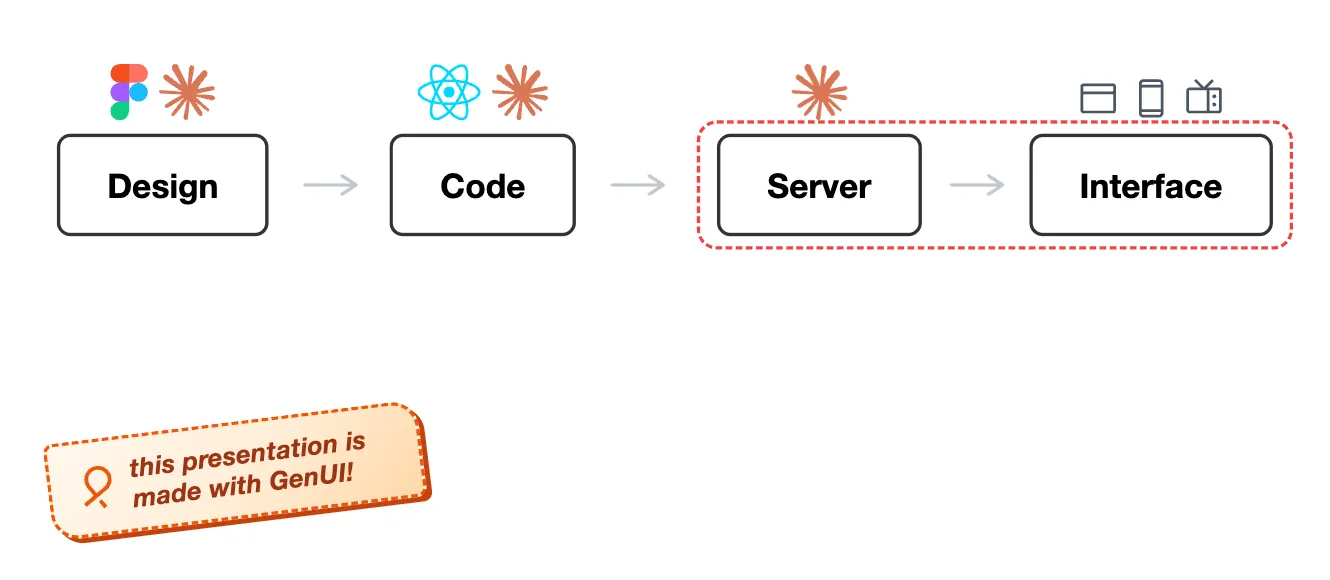
- If I use Figma or Claude Design to generate UI, that’s GenUI?
- If I use ChatGPT to output UI code, host it as a web app, that’s GenUI?
- If I use AI to generate and animate presentation slides, that’s also GenUI?
In this talk, I’ll focus on the “server and interface” part of that definition.
Notice in the above diagram, the Claude logo (representing AI) is not annotated above “Interface” yet. That’s because frontier LLM models are still too big to host on the client today (on-device and small models aside), but once that shifts at scale, another era-defining innovation.
Eliminating the Wall of Text
One obvious use case of GenUI is to eliminate the “Wall of Text” from AI responses:
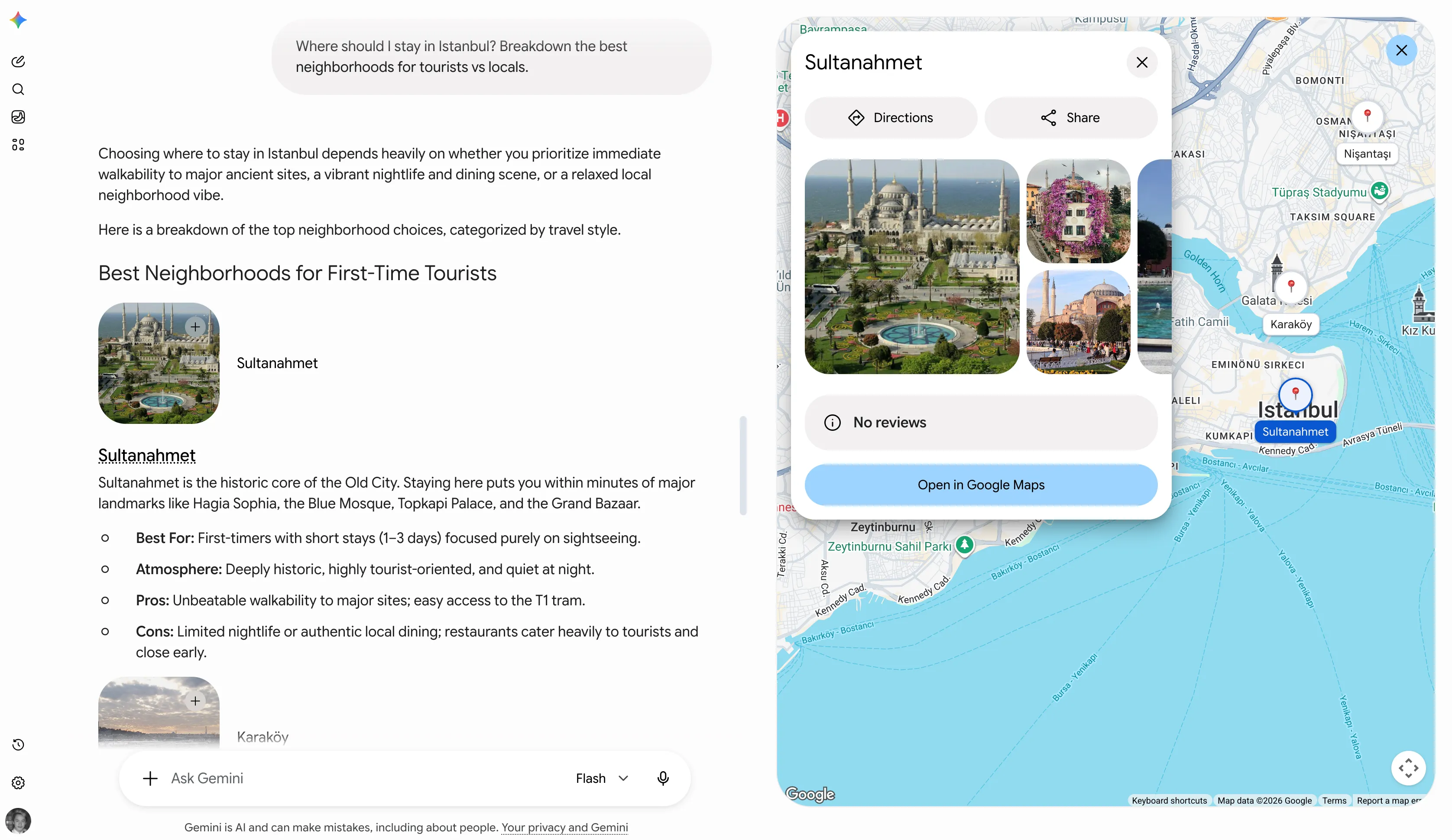
Gemini chat thread now with images and Google Maps
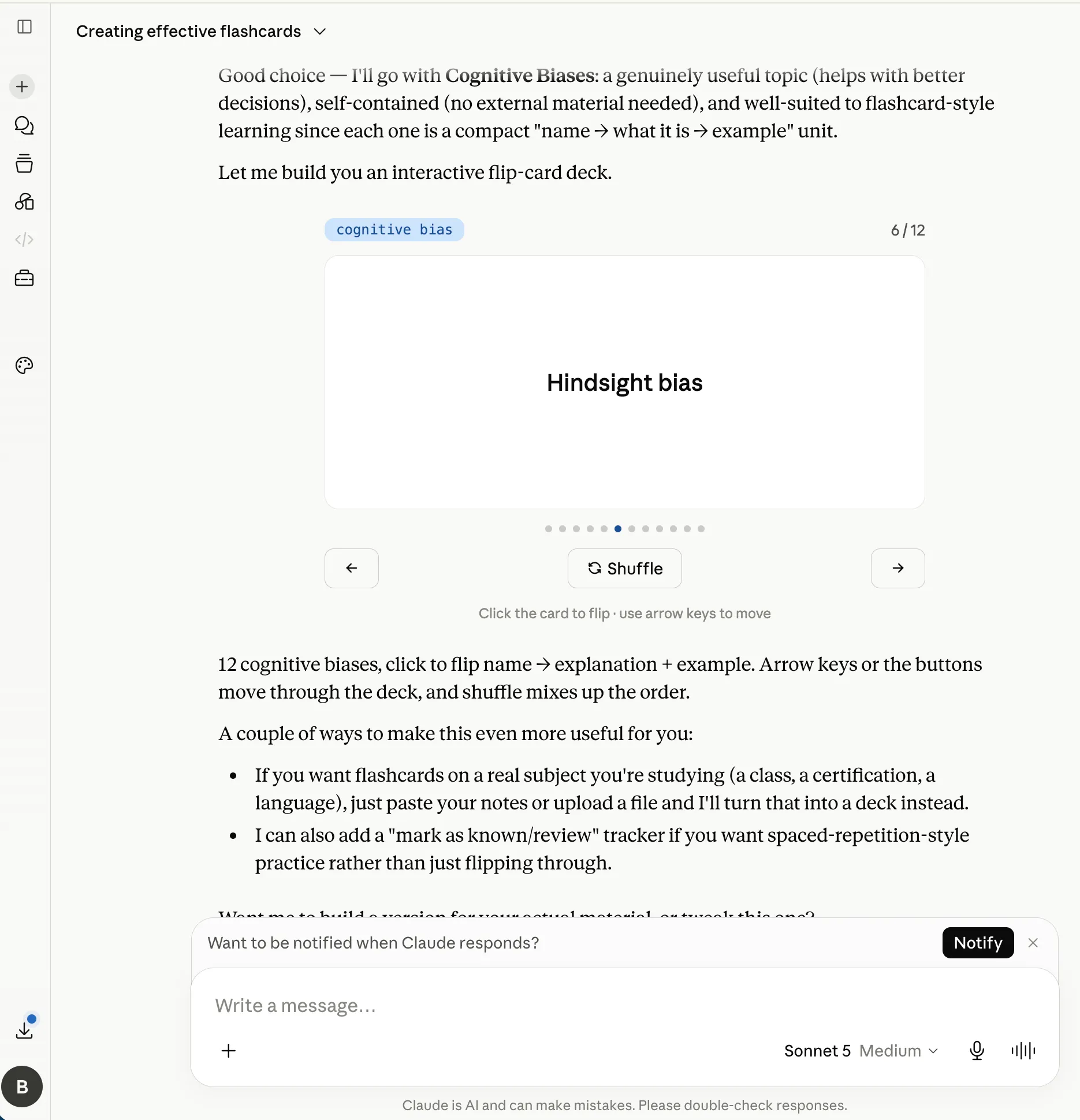
Claude chat thread now with interactive flashcards
As the GenUI ecosystem matures, we’ll see less “Wall of Text” and more ephemeral UI elements that are generated on the fly to suit the user’s intent.
Another perspective
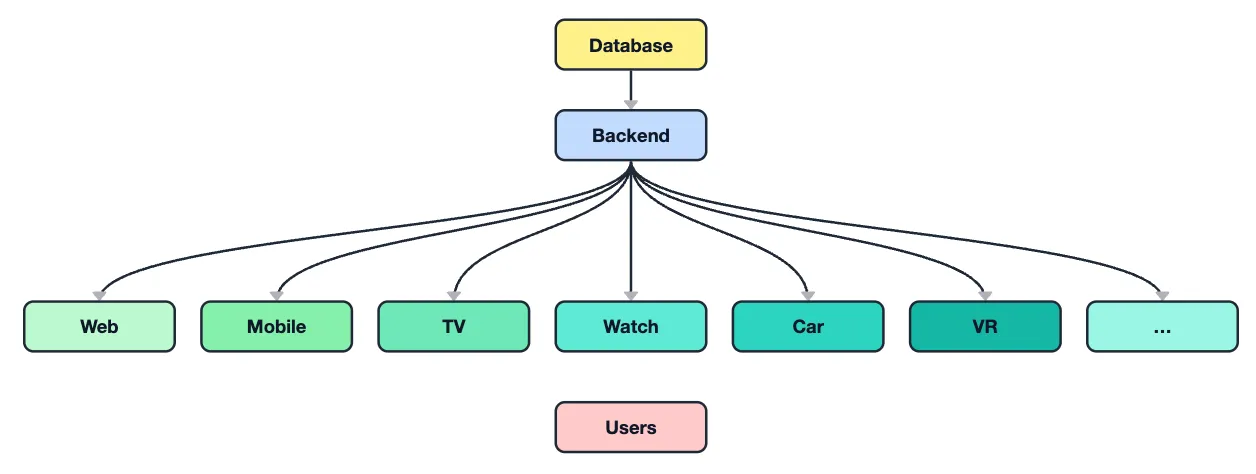
If you have a successful digital product, you might inevitably have a broad range of first-party responsibilities.
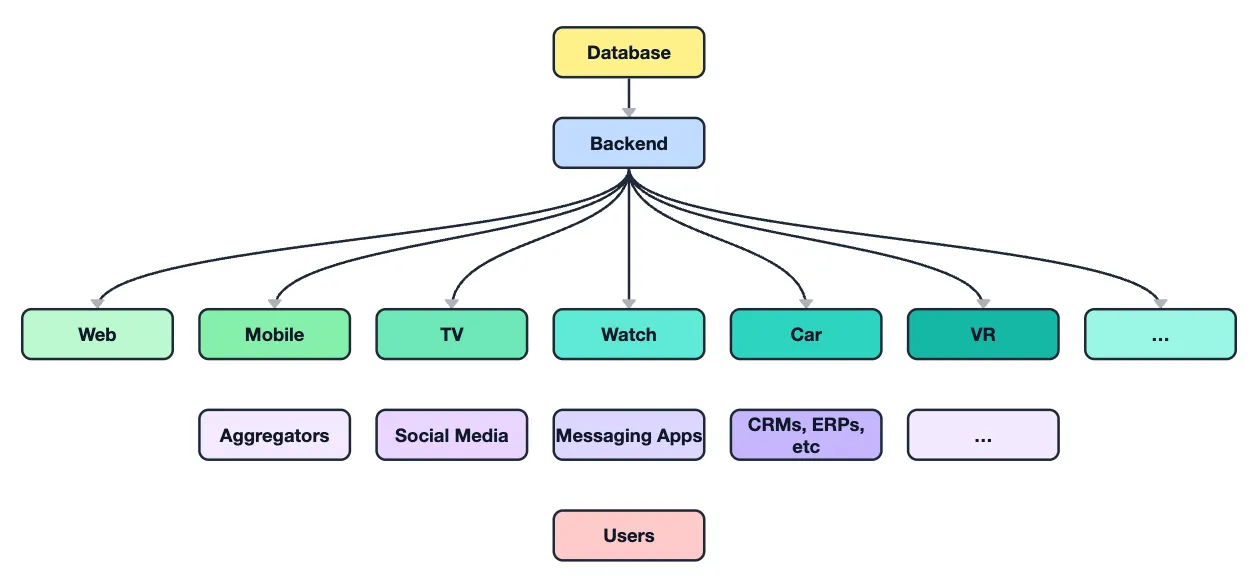
Don’t forget about the third-party integrations.
Some of them (e.g., Airbnb for real estates, or OpenTable for restaurants) handles the external UI for you, but some of them don’t (e.g., a brand social media post, or a white-labelled SaaS page).
Between your first-party and third-party variables, each of them multiplies each-other. In summary, the more features, integrations, and scales you have, the more complex the UI development becomes. Soon, you’ll feel out of resources, out of time, and out of the competition.
“Only the tech giants will have this type of complexity, most of the businesses will never even grow to this size!”. Yes, you are right, maybe the tech giants are only inventing solutions to solve their own problems, but think about who’s pushing AI everywhere?
So everyone’s looking for a solution. Maybe a “Super App”? One app to rule them all? Because if we can do everything in one place, we’ve narrowed down the UI problem again, right?
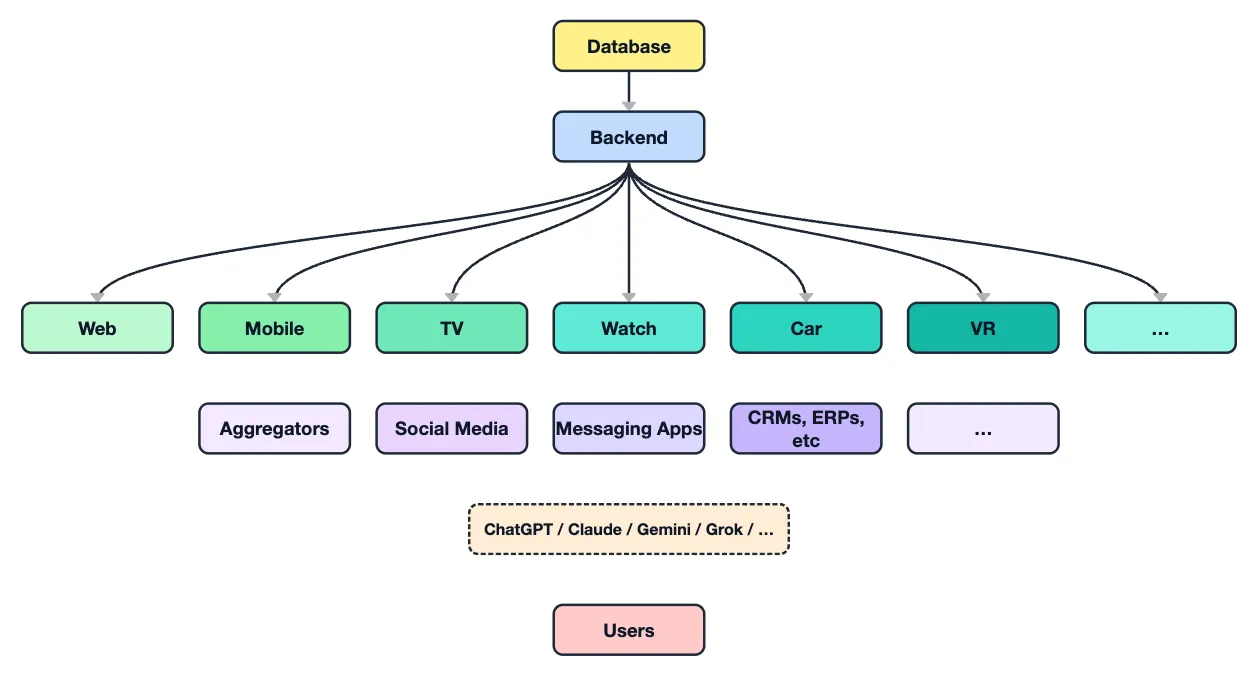
Enter the “AI chatbot” era. Today we use them for simple Q&A, but soon, you’ll be able to do shopping, travel booking, calendar scheduling, emailing, ordering food, etc. all within the “chatbot”.
Because one country did this back in 2017 and it worked out pretty well:
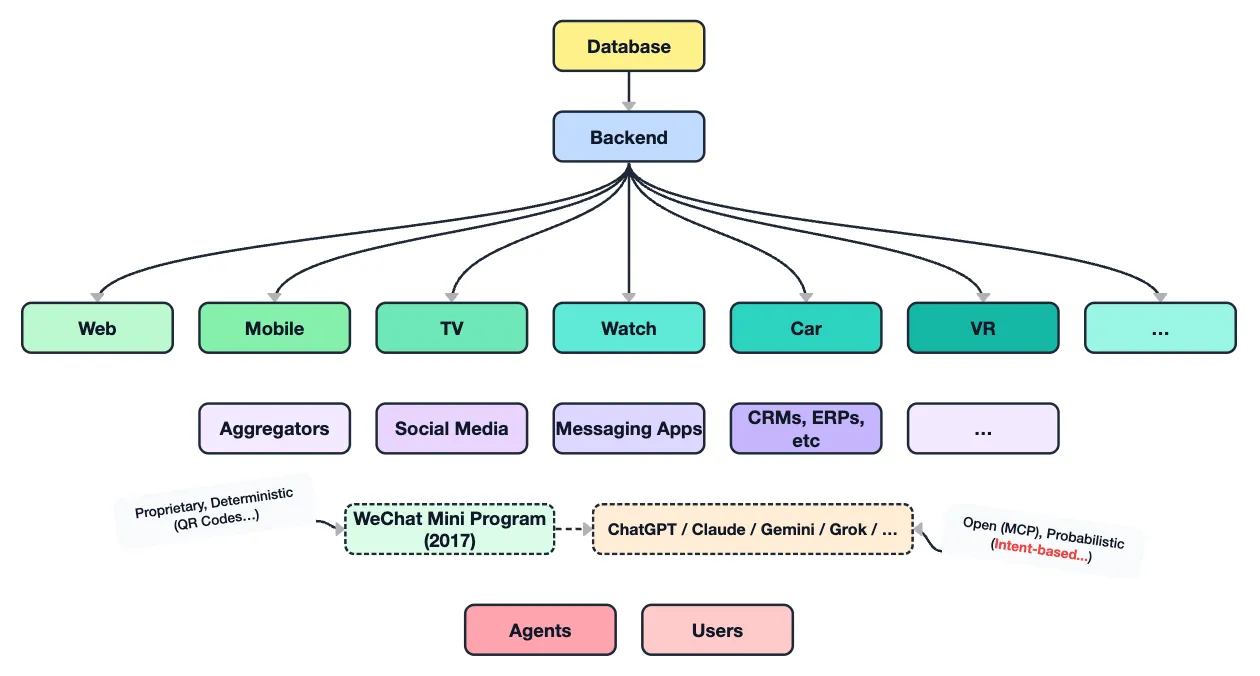
WeChat launched its Mini Program in 2017, due to the sheer scale of its user base. Not a surprise that Chinese tech companies are required to think about “scaling” issues across their infrastructure and product design early on.
Today WeChat Mini Programs serve roughly 1 billion monthly active users for: shopping, order food, schedule appointments, rent bikes, order ride-hailing services, track flights, play multiplayer games, stream web services, listen to music, smart home control, access cloud document editors, submit tax declarations, renew IDs, access public health records, etc.
No wonder Elon Musk wants something like it so badly. How many times do you think he said the word “WeChat” in early OpenAI strategy meetings?
High-level simplifications aside, these two comparisons do share very different technical starting points:
- WeChat started with proprietary technologies, and its original entry points had to be deterministic (e.g., QR codes…)
- AI technologies built upon open standards (MCP), and its entry points are “intent-based” (e.g., free-form text…)
The keyword here is “intent”. Because users are giving different queries, the responding UI should also be flexible enough to adapt to the user’s intent, right?
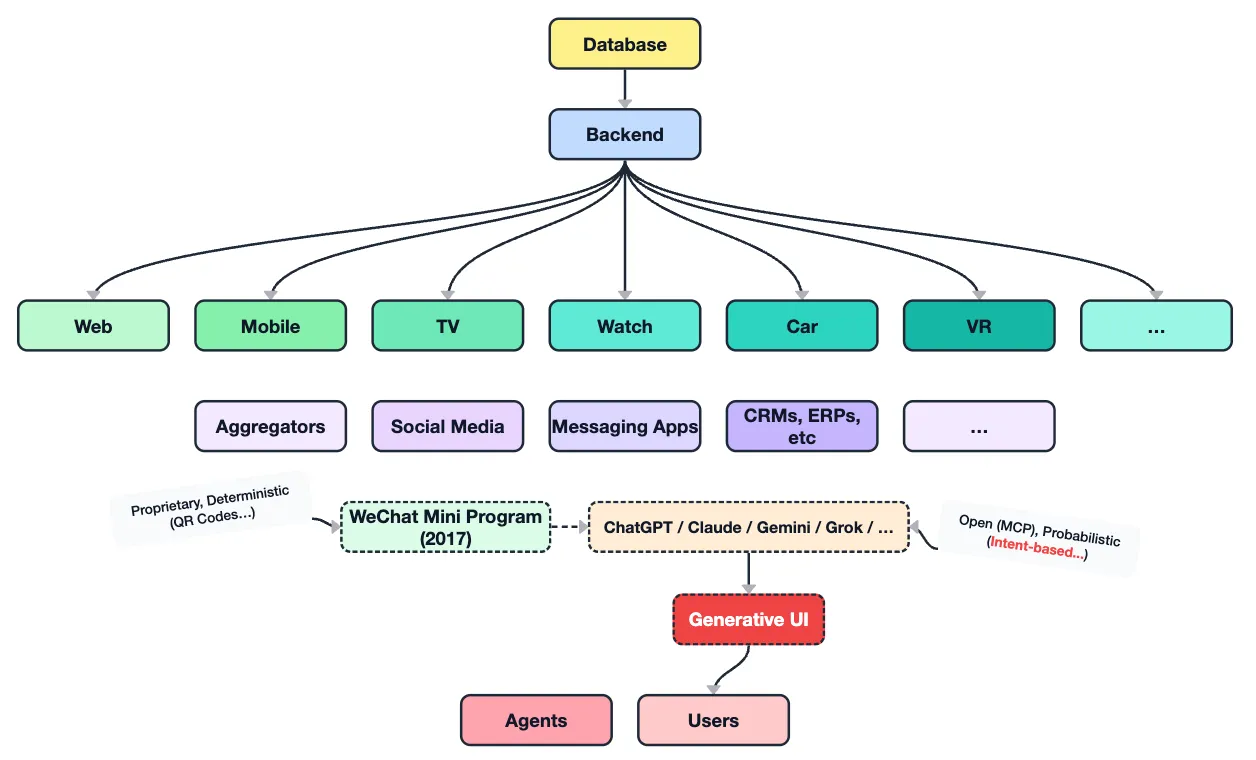
That’s where “Generative UI” fits in.
Without this “intent-based” entry point, Western apps would probably be scanning QR codes all day too.
Three categories
OpenUI’s State of Generative UI separates two independent axes: transport (where the UI appears — your app via AG-UI, or someone else’s host via MCP Apps) and generation (how much freedom the model gets). The three categories below are the generation axis:
- Static/Controlled
- Declarative
- Open-ended
They are not mutually exclusive, many products combine or mix them together.
Imagine a developer in 2026 who never heard of GenUI yet, but you ask them how to dynamically generate a web app with AI, their initial response might be something like: “Ask Claude to generate HTML/CSS/JS, and host it as a web app”. This approach is ok (companies are building internal dashboards or reporting tools this way). But for client-facing applications, serious security risk factors awaits when arbitrary HTML/CSS/JS is executed in the browser 🚨.
Our initial intuitions are still valid: this belongs to the “Open-ended” category. Today, the most prominent solution to generate and deliver arbitrary code to the client safely is MCP Apps “sandboxed iframes”.
Since arbitrary HTML is risky to send to the client, another safer messaging format is JSON!
If we send JSON to the client, how can it be translated into UI? To do that, we can define schemas and specifications (the “rules”) and write SDKs to support them (the “executions”). This belongs to the “Declarative” category. A2UI is one such format; OpenUI Lang and Vercel json-render are others competing on the same axis (token efficiency included).
Now we are sending JSON over the wire, and need to define a bunch of schemas, follow specifications, and write SDKs to support them. This sounds like a lot work just to dynamically render a button on the page. Is there a simpler way to adopt GenUI gradually?
If we simplify the model emitted JSON content down to a simpler data, like a tool result, and our app maps it onto existing components and props, we can also achieve dynamic rendering results. This belongs to the “Static/Controlled” category.
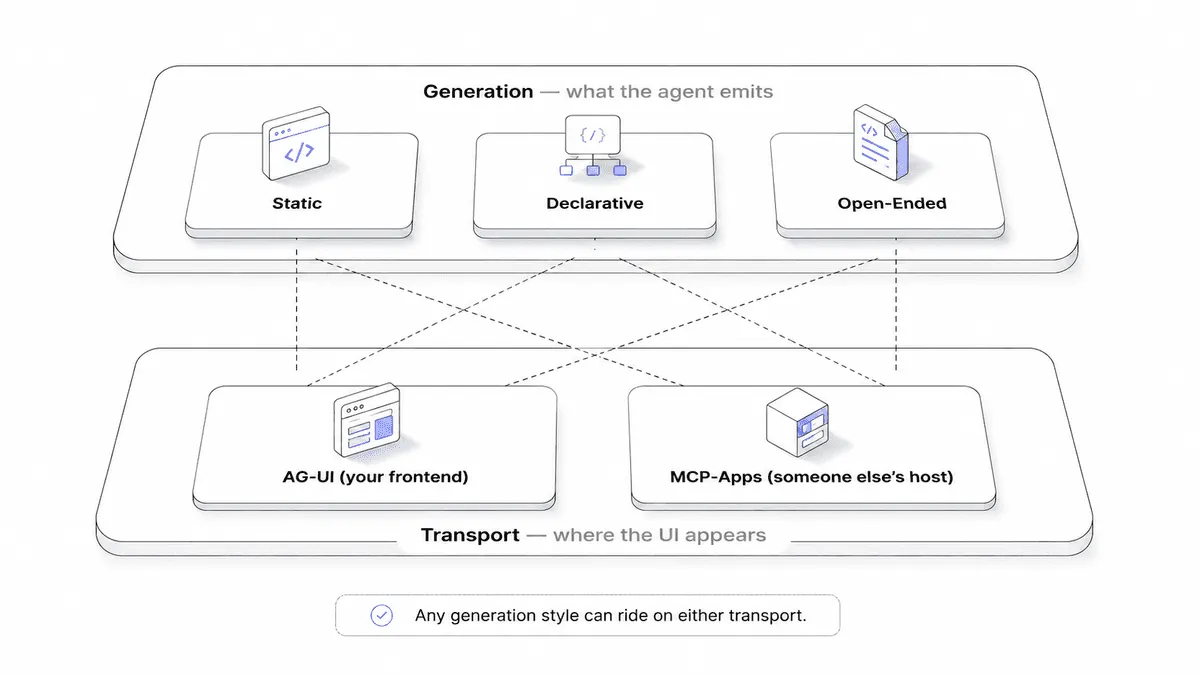
https://www.openui.com/blog/state-of-generative-ui-report
Static/Controlled
In this demo, we have a simple places listing page. First, we filter by popular topics like “Parks & nature”, “Cafes & bars”, etc. This is done without AI, simple SQL queries to the database, and can solve most of the basic use cases.
Now we have a “Ask AI” button, with it, users can input a free-form text query, and the places listing results will be updated dynamically to suit the user’s needs.
This is a simple migration to GenUI, we reused existing components, layouts, and design systems. What we added are:
- agentic backend framework (I’m using Mastra, other popular alternatives are LangGraph, ADK, etc.)
- AI helpers (I picked AI SDK. AI SDK makes AI code plumbing easy, manage submitted/streaming/error/retry, and more.)
A typical flow in the static/controlled demo is:
- User enters a free-form text query into chat, submit, POST to
/api/places-chat. - Mastra’s places agent gets the request. The LLM decides search args and calls
recommendPlacestool. - The tool runs in app code, not in the model: load curated places -> strict filters (mustMatch, open now, rating, budget)
-> rank by relevance -> return
{ query, appliedFilters, places, totalMatched }. - The LLM writes a short explanation of only those returned places, in that order.
- AI SDK streams the reply as a UI message: text parts for chat, plus a
tool-recommendPlacespart with the tool result. - When that tool part is complete (
output-available), the frontend validates it and picks a pre-built component from the registry (EmptyMatch,OpenStatus,PlaceCard, orPlaceResults) based on match count.
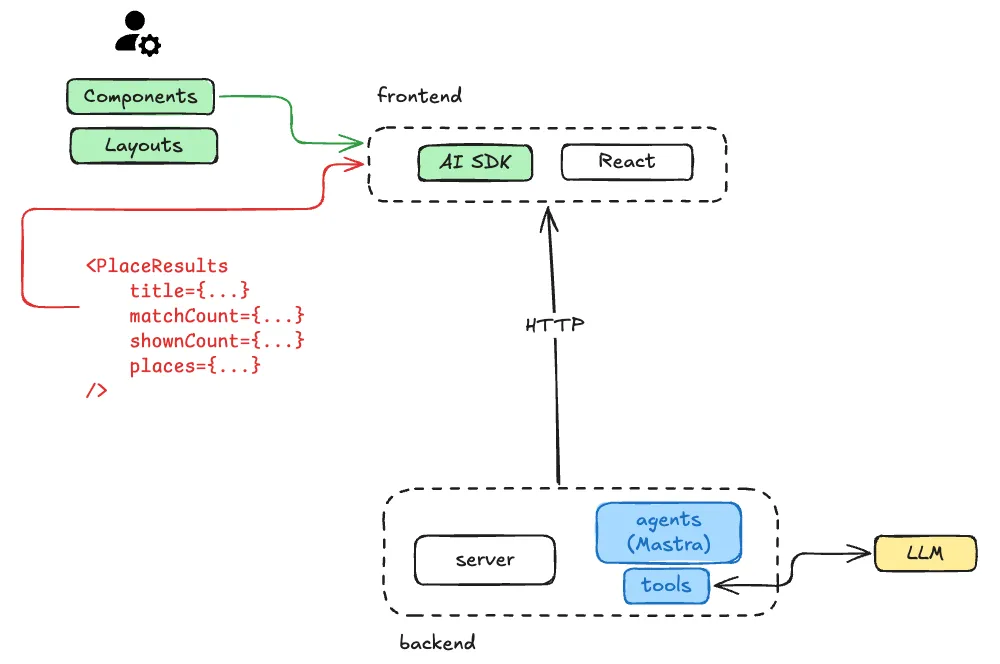
The advantage of the static/controlled approach is that it’s an easy path for teams to adopt: they keep their existing components and layouts, and get consistent UI because the model is constrained by the tool schema, while deterministic app code owns which component mounts.
Declarative
Second demo is a /planner page, this time no places grid, no layouts I designed
upfront. Only a text input asking “What are you planning?”. Type a goal like
“Plan a weather-aware weekend trip from Paris to Porto”, the agent composes the
whole page: an intro paragraph, a flight estimate, a live weather widget, one schedule
per day, and a packing checklist, arranged in a dashboard grid that it picked itself.
In the static demo, the model only chose search arguments for recommendPlaces; app code mapped the tool result onto
existing components. Here the model decides the layout and which authorised components to show.
Before we dive into the details of the declarative approach, let’s take a look at a simplified server-client stack:
server -> transport protocol -> clientIn the declarative approach, we replace each layer with a declarative specification:
- which spec for generating the user interface? (e.g., A2UI)
- which spec for connecting between agentic server and client? (e.g., AG-UI)
- which spec between agents and agents? (e.g., A2A)
But specifications are just the “rules”, we need “executors” to implement them. Therefore, for each spec, we need at least one SDK to support them.
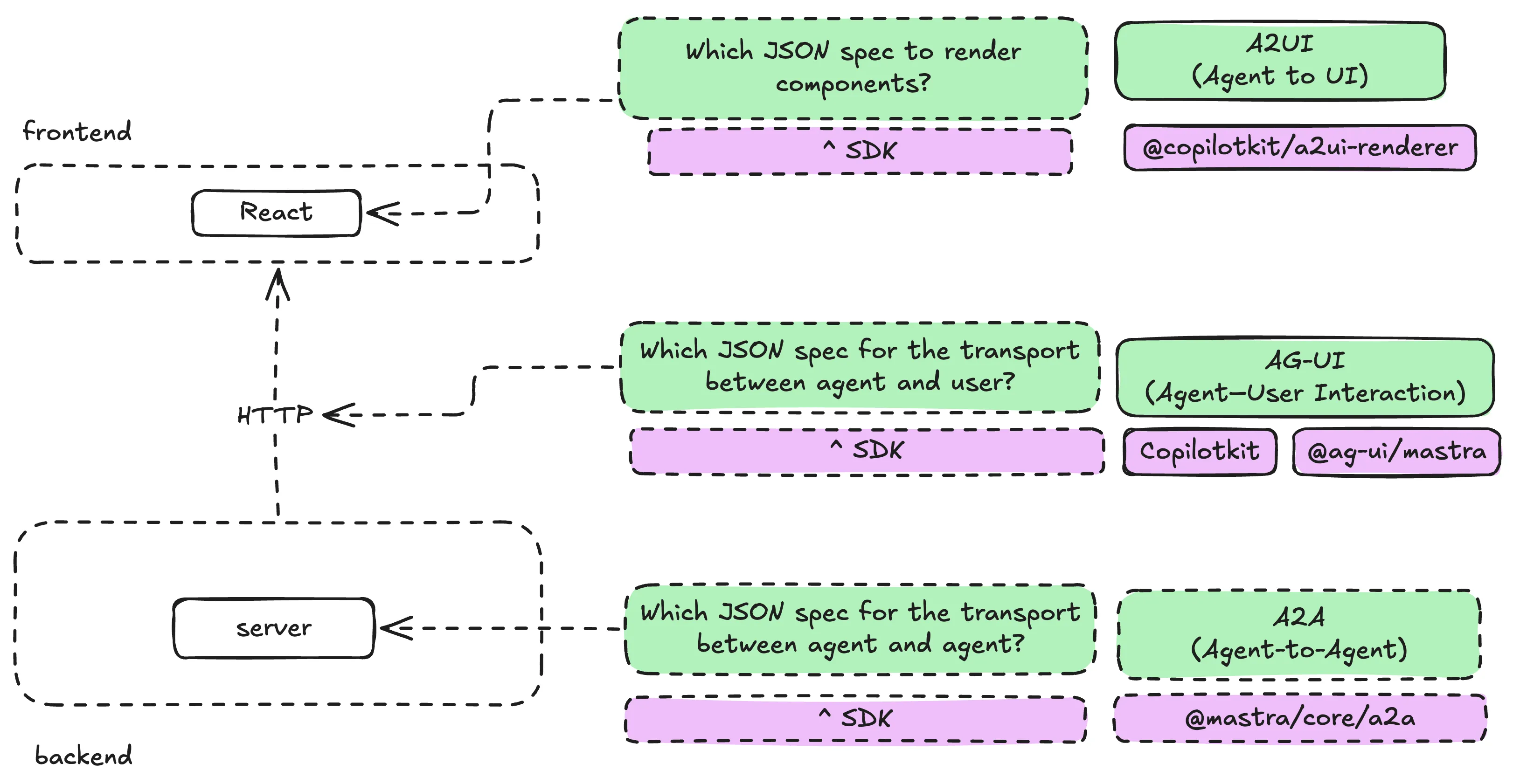
The A2A (agent to agent) protocol were not needed for my use case, but if your agents needs to discover and collaborate complex tasks with third-party agents, this protocol is worth considering for that.
This gives us an insight of the future: “if writing code is cheap, then the humans will offload that to the AI, and move on to designing higher level requirements, like specifications”. Higher level definitions offer higher flexibility and interoperability than lower level static code.
Let’s go back to our simplified stack and fill in the blanks:
Mastra agent (server) -> AG-UI (transport protocol) -> A2UI (interface)- A2UI v0.9 is the spec the model generates: a list of components, their
props, and how they nest. I’m on
v0.9andv1.0is on “Candidate” status. - AG-UI is the spec for events between the agentic backend and the client: run started, run finished, text, tool calls, state, and typed “activities”. It doesn’t care what the UI looks like, it just carries it.
This may sound abstract, let’s look at sample events of each protocol:
A2UI events:
[ { "version": "v0.9", "createSurface": { "surfaceId": "trip", "catalogId": "https://portoaberto.dev/catalogs/planner/v1" } }, { "version": "v0.9", "updateComponents": { "surfaceId": "trip", "components": [ { "id": "root", "component": "DashboardGrid", "children": ["intro", "weather"], "fullWidthChildren": ["intro"] }, { "id": "intro", "component": "Text", "text": "A weather-aware day in Porto" }, { "id": "weather", "component": "WeatherWidget", "location": "Porto", "temperature": 20, "feelsLike": 22, "conditions": "Clear sky" } ] } }]AG-UI events:
{ "type": "RUN_STARTED", "threadId": "thread-123", "runId": "run-456" }{ "type": "ACTIVITY_SNAPSHOT", "messageId": "surface-trip", "activityType": "a2ui-surface", "replace": true, "content": { "status": "building" } }{ "type": "ACTIVITY_SNAPSHOT", "messageId": "surface-trip", "activityType": "a2ui-surface", "replace": true, "content": { "a2ui_operations": [ ... ] } }{ "type": "RUN_FINISHED", "threadId": "thread-123", "runId": "run-456" }Within a2ui_operations, are A2UI events.
Then the “executors”. I used CopilotKit on both ends, which
ships as three packages: @copilotkit/runtime on the server, @copilotkit/react-core/v2 in the browser, and
@copilotkit/a2ui-renderer for the component catalog and the tree renderer. The @ag-ui/mastra adapter bridges AG-UI
to a Mastra agent, so the backend framework from the static demo stays exactly the same.
Keep the three layers separate in your head: AG-UI is how the events travel, A2UI is what the model generates, and the React components are still ours. CopilotKit is neither the model nor the agent, it’s the plumbing.
A typical flow in the declarative demo is:
- User enters a goal into the planner input, submit, POST to
/api/copilotkit. CopilotRuntime(hosted inside the Next.js app) routes the run through theMastraAgentadapter to myplannerAgent.- The runtime injects an extra tool,
render_a2ui, into the agent and hands the model the catalog schema, so the model knows which components exist and what props they accept. - If the goal needs real data, the agent calls its domain tools first:
weatherToolfor live weather,recommendPlaces(the same tool as the static demo) for curated places. - The agent calls
render_a2uiexactly once with{ surfaceId, components, data? }, describing the page it wants. - CopilotKit’s A2UI middleware validates those arguments against my schemas and expands them into A2UI v0.9 operations.
- Those operations are streamed to the client as an AG-UI
ACTIVITY_SNAPSHOTevent withactivityType: "a2ui-surface". The “Building your interface” state and the finished surface share one message ID, so the completed page replaces the spinner instead of appending below it. Place recommendations can keep updating the same surface asdata.placesstreams in viaupdateDataModel. - The client walks the component tree and asks my catalog to render each component ID in React.
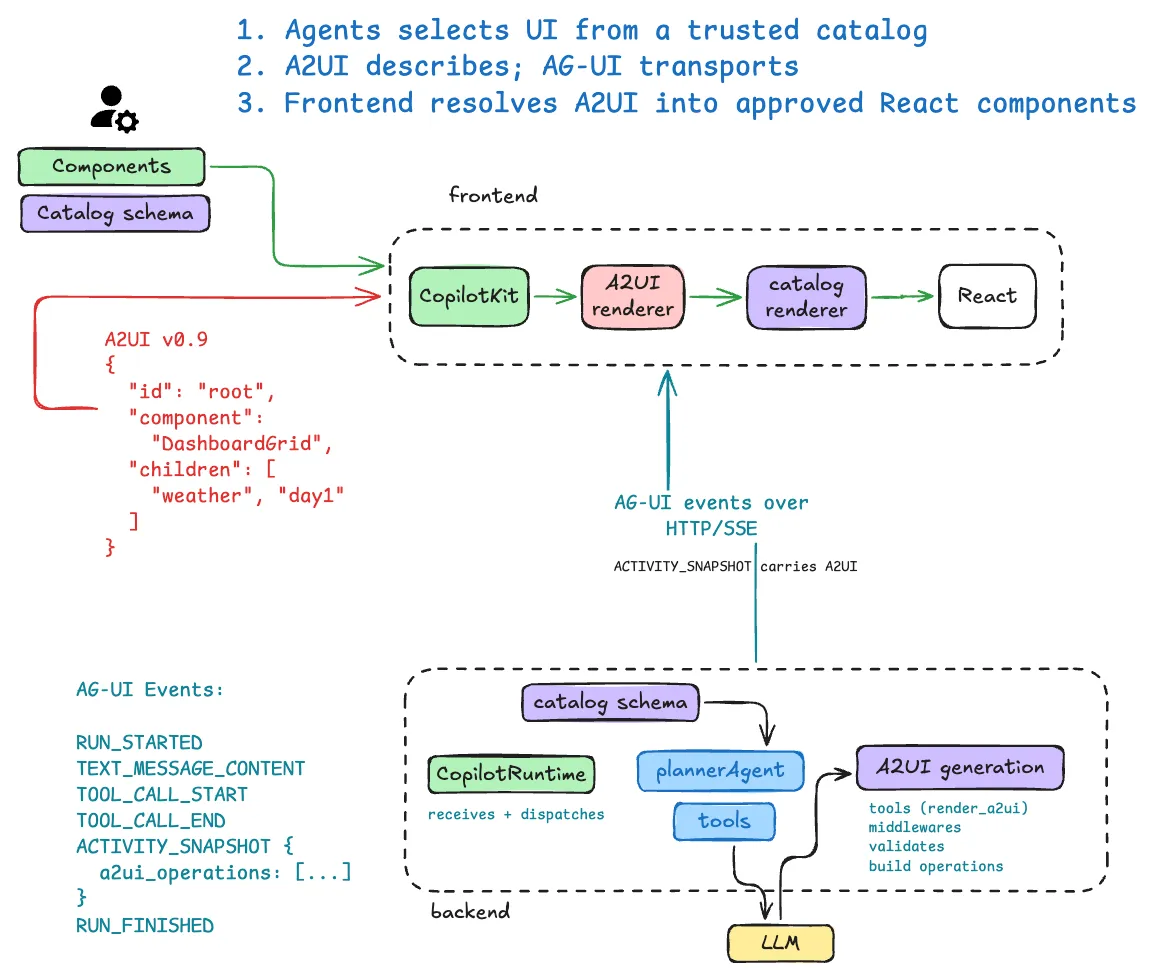
The catalog is the contract
If the model can pick components and compose layouts, then the catalog is the only thing standing between “flexible UI” and “arbitrary code in my page”. Zod schemas describe each component to the model, and React renderers that implement them.
Zod definitions (what the model may ask for) +React renderers (what actually runs) | vcatalog (with a versioned catalogId)I enabled CopilotKit’s basic catalog for the generic pieces (text, rows, lists, cards, tabs), then added the components
that carry my domain and my design system: WeatherWidget, FlightEstimate, DaySchedule, PackingChecklist,
PlaceRecommendations, DashboardGrid, and more.
The declarative approach offers real flexibility: the model composes layouts I never designed, the output is portable across clients that understand the same spec, and none of it requires shipping arbitrary code to the browser. The downside is we need to write more specs, more SDKs, and a pile of policy that lives in a prompt rather than in a type system.
Open-ended
I did not prepare any open-ended GenUI demo. But there are some interesting examples on the internet already:
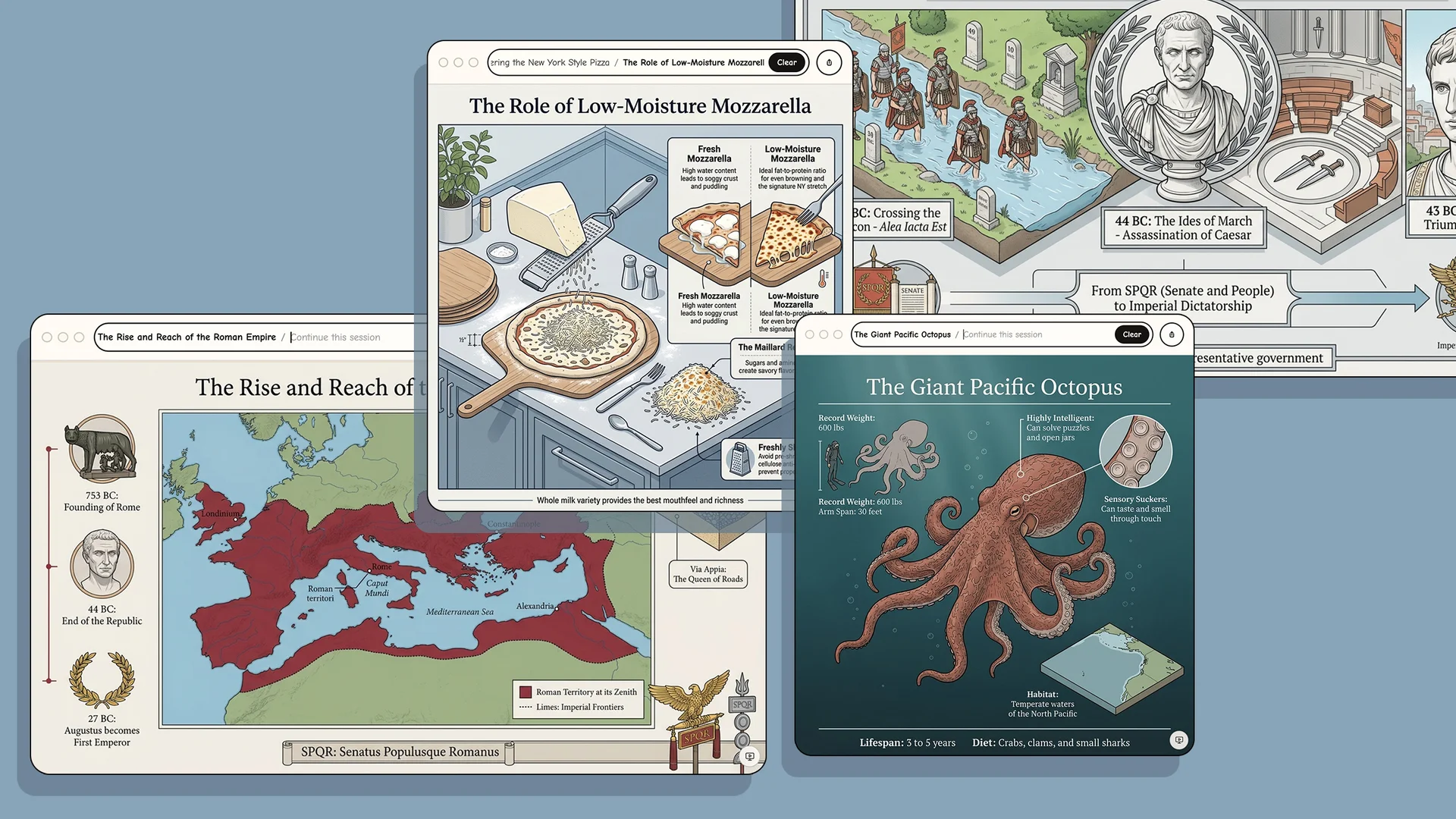
Flipbook (released in April 2026) is a demo app created by few researchers that generate real-time, on-demand visual explanations about any topic directly from the model to the browser.
Within your chatbot
Chatbots starting to generate ephemeral interactive components on the fly:
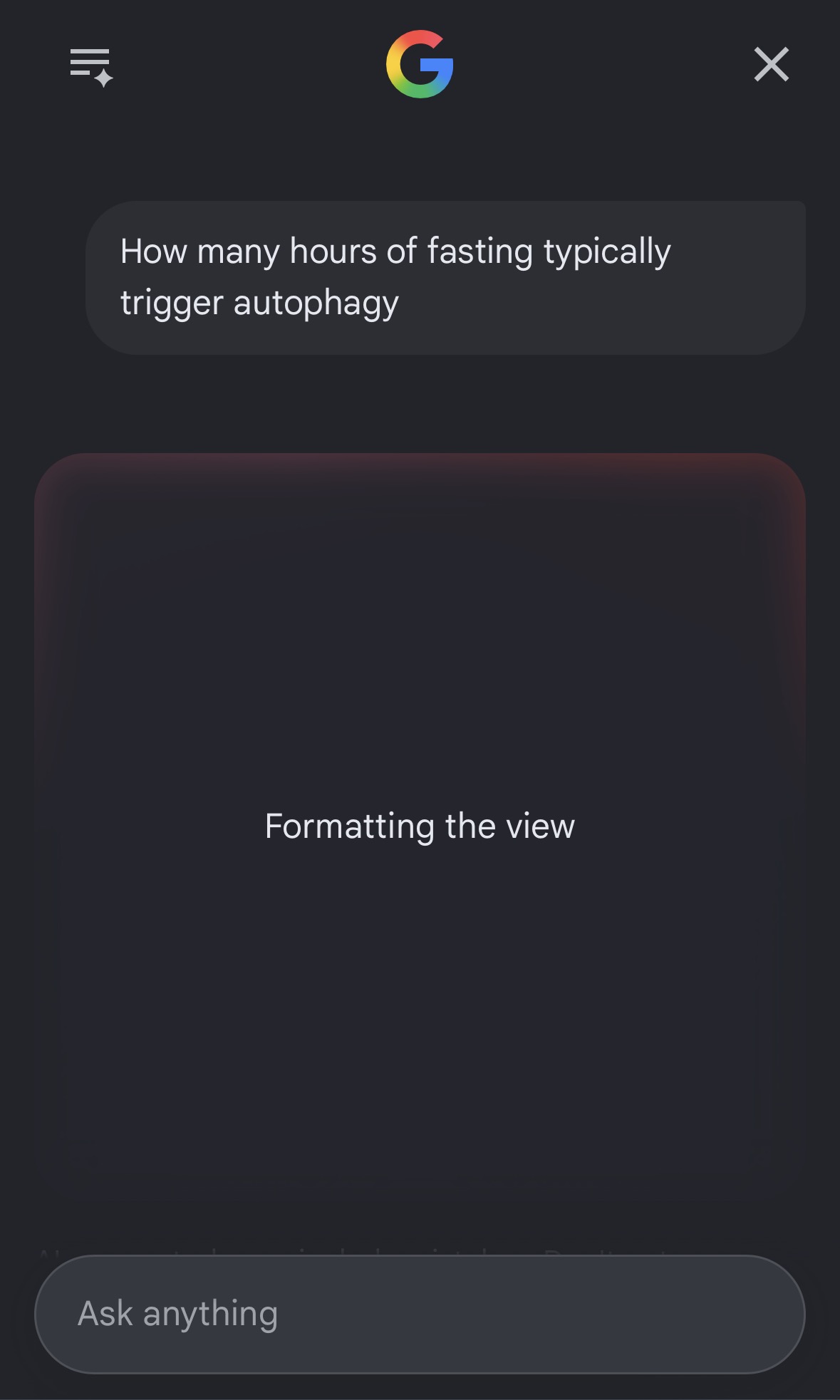
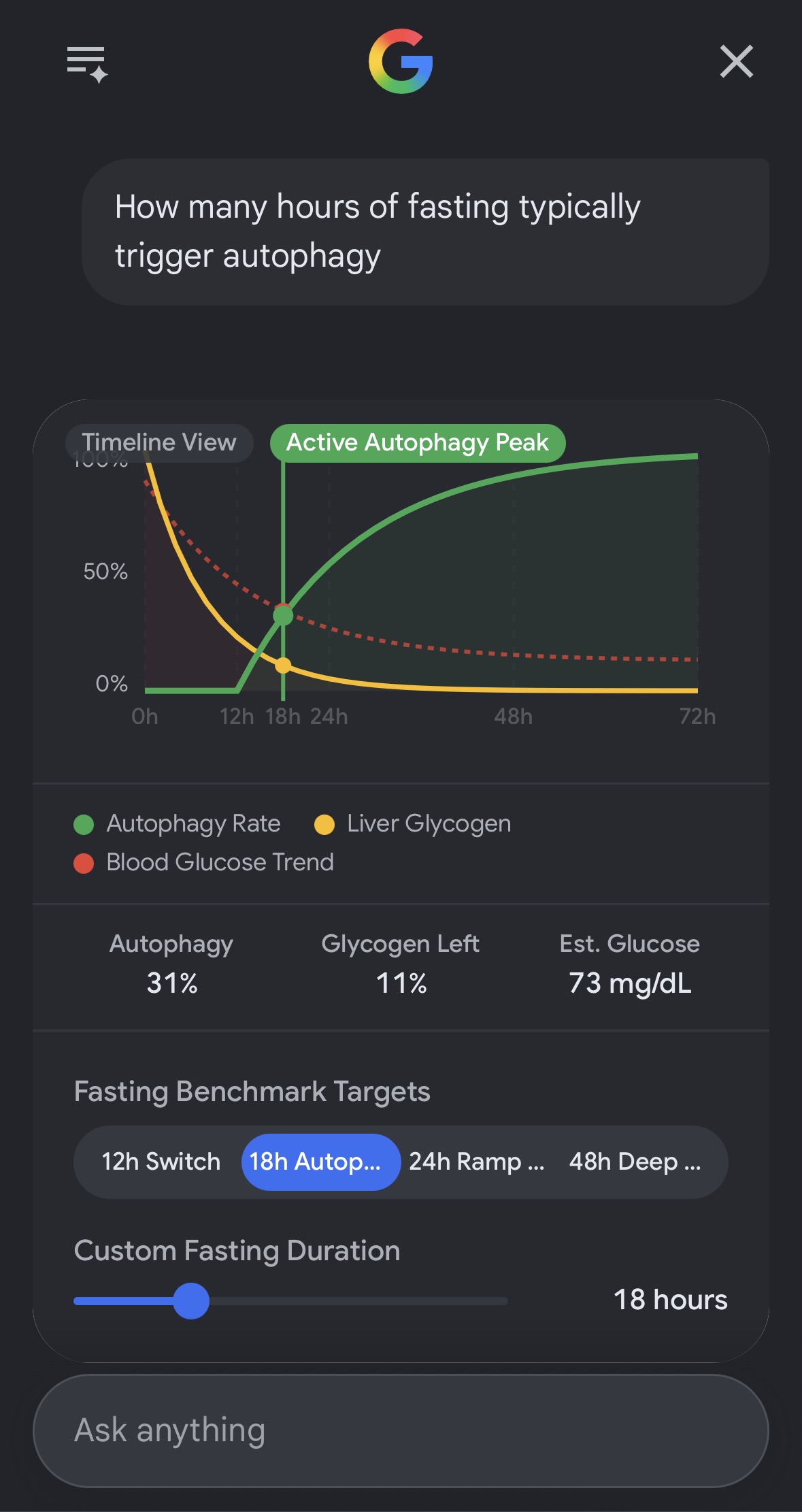
The major differentiator is that the open-ended approach requires no catalog or schemas, the LLM model emits raw UI code.
The open-ended approach has a risk of arbitrary code execution (which is why sandboxed iframes are the most popular implementation today), but latency, cacheability, auditing, consistency, etc. are also major system design considerations.
Mix n’ match
Although the ecosystem agreed on these three broad categories, they are not mutually exclusive:
- MCP Apps give you creative freedom inside an iframe, and with it clashing design systems, duplicate scrollbars, performance costs, and a security boundary you now own.
- A2UI gives you native rendering and a safe payload, and with it a component catalog you cannot step outside of, which hurts the moment you need real client-side logic.
1. A2UI over MCP
An MCP server returns an A2UI payload instead of text or a bundled web app. The host hands the JSON to its own renderer,
and no iframe is involved. Notice this is the same v0.9 operations from my planner demo, just arriving over MCP instead
of AG-UI. That’s the interoperability argument for specs, in one payload.
2. MCP Apps inside A2UI
The reverse direction: we define one custom A2UI component that is a sandboxed iframe wrapper, and let the model drop an MCP App into a declarative surface next to the native components.
3. A2UI inside MCP Apps
The MCP App ships its own A2UI renderer inside the iframe, fetches A2UI payloads through the app bridge (pattern 1 again), and renders them locally.
Read https://developers.googleblog.com/a2ui-and-mcp-apps/ for more detailed breakdown with demos.
Summary
In a production-ready GenUI app, we’ll likely mix all three approaches: static components for core flows, declarative for dynamic compositions, and an iframe for an ephemeral widget that needs to solve one particular use case.
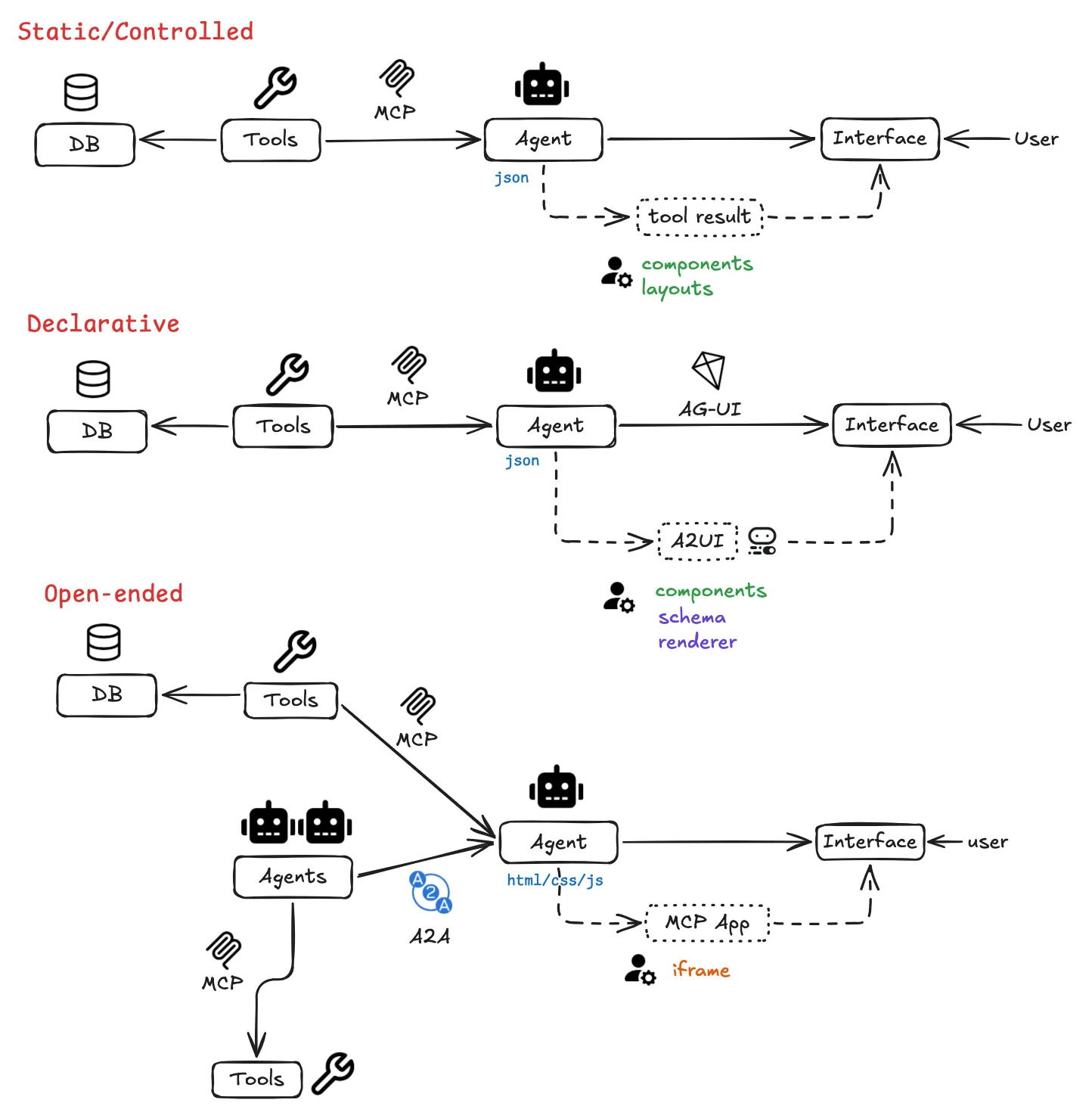
To continue the journey, we need to be asking the following questions:
- JSON was not designed for the AI era. Alternative formats like OpenUI Lang already push on token efficiency versus verbose JSON specs; the next message formats should improve further on progressive streaming, probabilistic tolerance, and more.
- Specifications are overtaking the role of code, should we be focusing on specialised specifications? (e.g., specs for charts, forms, presentation slides, etc.)
- As designers and developers move up to tasks of higher abstractions, what does a job of “designing UI for intents” look like?
- Speed, latency, cacheability, security, auditing, consistency, cost, etc.
- Once the above “known problems” are solved or improved, what’s stopping us defaulting to GenUI?